Asus Chromebook CX1405 review: Alternate to Windows for on the move people?
Pros & Cons
Pros
| Cons
|
Detailed Review
First Impressions
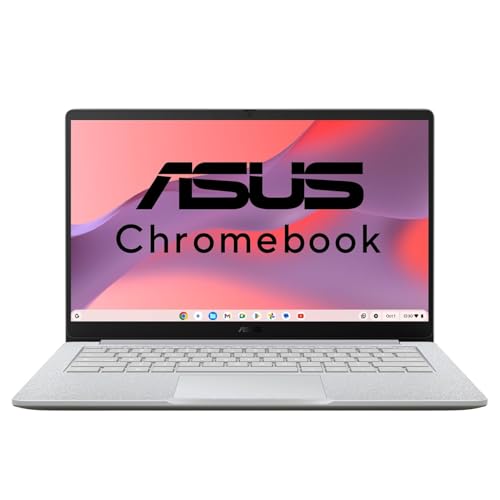
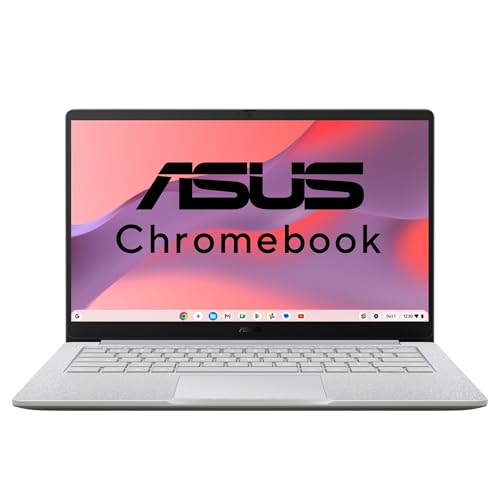
When the ASUS CX1405 arrived at my doorstep, the first thing I noticed was how ridiculously light it felt. At 1.38kg, this thing is lighter than most textbooks I carried in college. The Pure Grey finish looks professional enough for office meetings, though it does pick up fingerprints faster than I’d like. The build quality is decent plastic – not premium, but sturdy enough that I didn’t feel nervous tossing it in my backpack.
How I Tested This
I used this Chromebook as my primary work machine for three weeks. My typical day involves 15-20 Chrome tabs open (Gmail, Google Docs, Sheets, YouTube, and various news sites), video calls on Google Meet, and occasional Netflix streaming during chai breaks. I also tested it during a trip to my hometown in UP, where I worked from a relative’s house with patchy Wi-Fi. The offline Google Docs mode saved me multiple times. I even let my nephew use it for his online classes for a week – he’s brutal with electronics, and it survived.
Performance
The Intel Core 3-N355 processor paired with 8GB RAM handles Chrome OS smoothly. I could keep 12-15 tabs open without any noticeable slowdown, though pushing beyond 20 tabs with YouTube running did cause slight hesitation. Video calls on Meet worked fine, but I noticed the laptop getting warm near the keyboard during hour-long calls. Not hot enough to be uncomfortable, just noticeable. The 14-inch FHD display is bright enough for indoor use and decent for watching content, though colours feel slightly washed out compared to my MacBook. Viewing angles are acceptable – nothing to complain about at this price.
The Storage Reality Check
Here’s where I need to be honest – 128GB SSD sounds okay on paper, but Chrome OS itself takes up space, and you’re left with around 90-100GB usable. If you’re someone who downloads movies for offline viewing or wants to keep lots of Android apps, you’ll feel the pinch within months. I had to rely heavily on Google Drive, which works perfectly fine if you have stable internet. In tier-2 cities with inconsistent connectivity, this could be frustrating.
Battery Life
The 42WHr battery gave me around 9-10 hours of mixed usage, which genuinely impressed me. I could leave my charger at home for a full workday without anxiety. This alone makes it excellent for students or people who commute.
Value for Money
At around ₹30,000, you’re getting a capable machine for browsing, document work, and media consumption. But let’s be real – this isn’t for video editing, heavy multitasking, or serious gaming. It’s a focused tool for people whose life revolves around Google’s ecosystem. Amazon and Flipkart reviews echo similar sentiments – great for students, not ideal for power users.
Score Breakdown
| Performance | 7.5/10 | |
| Display Quality | 7/10 | |
| Battery Life | 9/10 | |
| Build & Portability | 8/10 | |
| Value for Money | 7/10 |
Key Specifications
| Processor | Intel Core 3-N355 |
|---|---|
| RAM | 8GB |
| Storage | 128GB SSD |
| Display | 14-inch FHD (1920×1080) |
| Graphics | Intel UHD Graphics |
| Battery | 42WHrs |
| Weight | 1.38 kg |
| Operating System | Chrome OS |